
JPK_V7M — what Atestio fills in automatically
Atestio prepares the JPK_V7M (monthly) or JPK_V7K (quarterly) file from documents already in the system. This article explains where each piece of data comes from and which fields Atestio doesn’t fill in automatically.
Where the data comes from
Section titled “Where the data comes from”| Part of the file | Source |
|---|---|
| Sales | Invoices issued in the given period |
| Purchases | Invoices from the KSeF inbox plus manually added documents |
| Business details | Settings → Business details |
| Tax office | Settings → Business details |
What Atestio fills in automatically
Section titled “What Atestio fills in automatically”- Amounts broken down by rate — from invoice line items, not manual totals.
- GTU codes — if they were set on the product or line item.
- Procedure markers — wherever they follow from the document type.
- Assignment to a period — based on the sale date or the receipt date.
What Atestio doesn’t fill in automatically
Section titled “What Atestio doesn’t fill in automatically”It doesn’t decide how to recognize a purchase-side correction. Documents that need a separate decision are held and shown separately — see When to issue a correction.
It doesn’t fill in missing GTU codes. For sales of goods or services covered by GTU, the code needs to be set on the product — Atestio will show a warning, but won’t assign the category automatically.
It doesn’t send the file without confirmation. Sending is always a deliberate action by the user.
Checking the file before sending
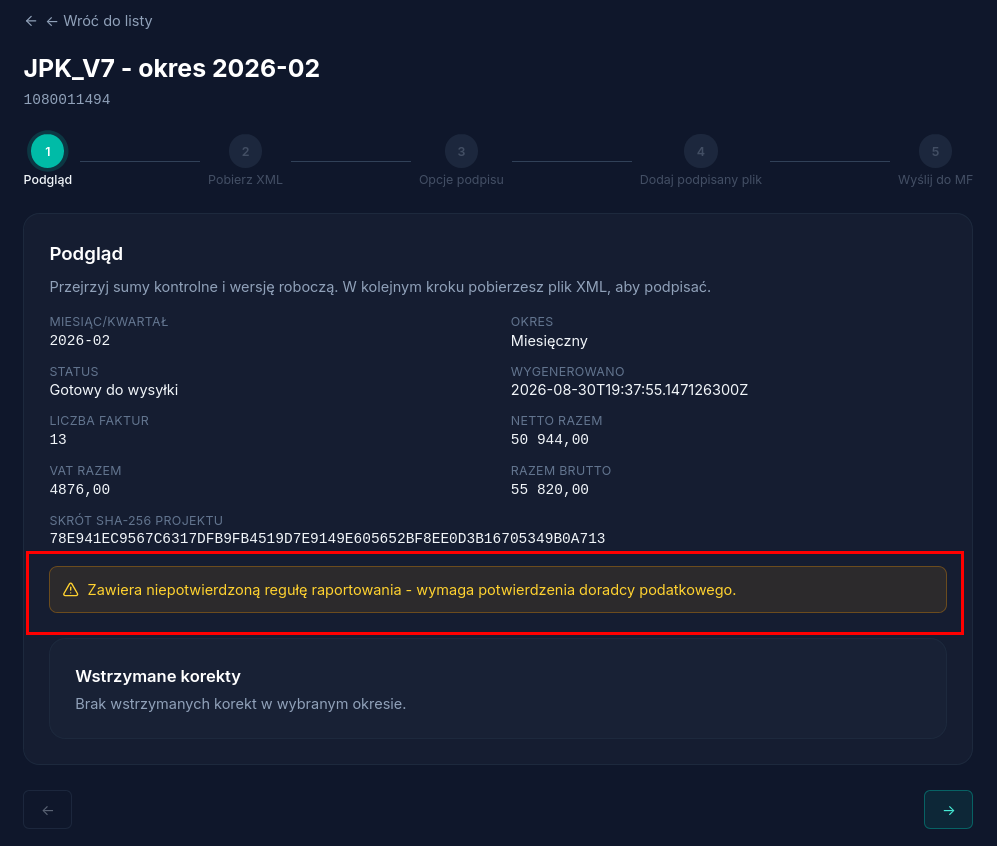
Section titled “Checking the file before sending”Before sending, Atestio shows a summary: the number of documents, totals broken down by rate, and a list of items that need attention. It’s worth comparing the totals against your own records — the fastest way to catch a missing document.
If the draft contains a reporting rule that Atestio can’t confirm with certainty, the preview shows a separate warning about it — sending is still possible, but requires prior confirmation from a tax advisor:
What’s next
Section titled “What’s next”Was this article helpful?
Thank you.
Thank you. Other articles on this topic may help; if you still can’t find an answer, contact us: pomoc@atestio.pl.