
Bulk corrections
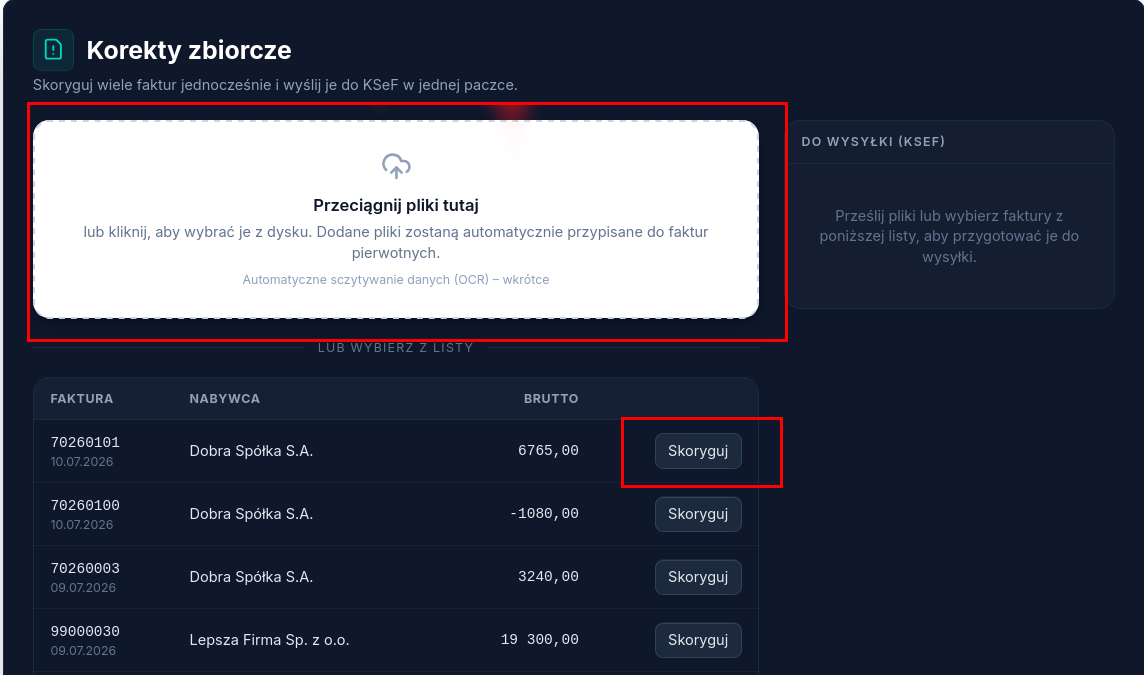
The bulk correction wizard lets you prepare and send multiple corrections at once, in a single batch to KSeF — instead of fixing each invoice separately.
How to prepare a batch of corrections
Section titled “How to prepare a batch of corrections”- Open Bulk corrections from the main menu.
- An accounting firm account additionally selects the client whose invoices the correction concerns — see Navigating Atestio.
- Add corrections one of two ways: drag files in (or click to choose them from disk) and match each file to its corresponding original invoice, or choose Correct next to an invoice in the list below, with no file.
- Corrected items move to the To be sent (KSeF) panel on the right.
- Once the batch is complete, send it to KSeF.
Sending results
Section titled “Sending results”After sending the batch, Atestio shows the result for each document separately — acceptance by KSeF, or the error text if the document was rejected. One document being rejected doesn’t affect the other items in the batch.
What’s next
Section titled “What’s next”Was this article helpful?
Thank you.
Thank you. Other articles on this topic may help; if you still can’t find an answer, contact us: pomoc@atestio.pl.