
Settings overview
Settings are split into four tabs: General, Customization, Billing, and Advanced. This article describes what’s in each one; individual features are covered in detail in the linked articles.
General
Section titled “General”- Account details — the user’s name and email address.
- Change password — for accounts signing in with email and password; requires the current password.
- Two-factor verification (2FA) — see Two-factor verification.
- Email language — Polish, English or the same as your account language, independent of the app language (for example, when you forward emails to clients).
- AI credit usage — the number of OCR credits used and remaining in the current cycle, see Plan and billing.
Customization
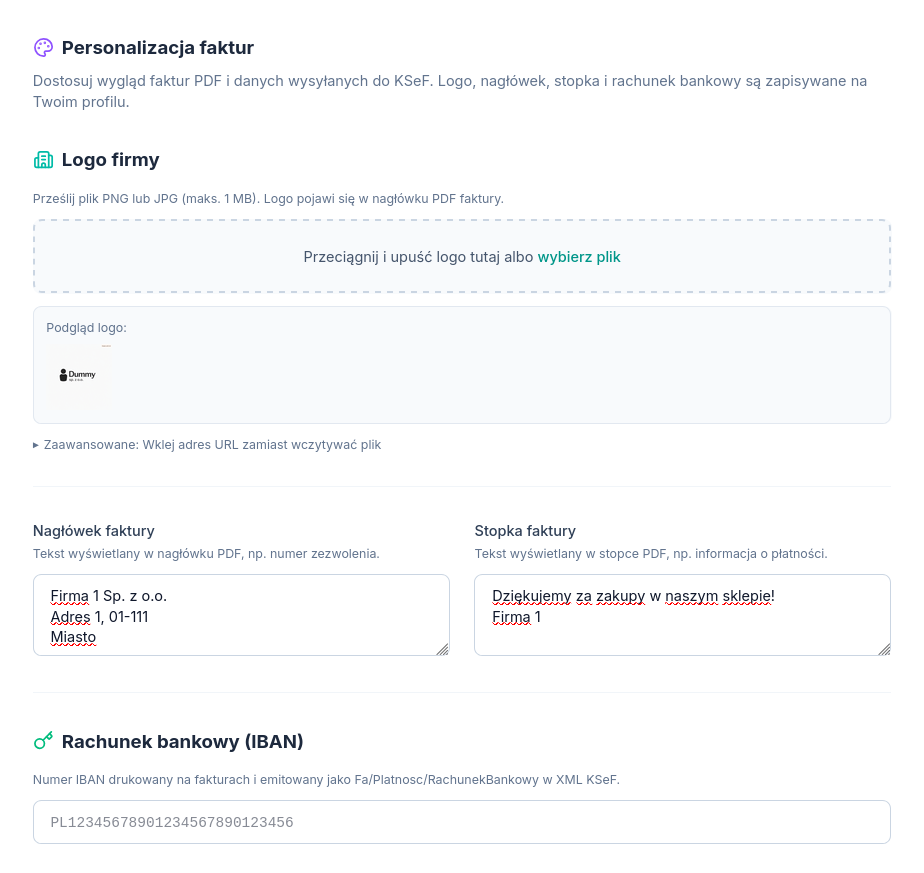
Section titled “Customization”The appearance of issued PDF invoices:
- Company logo — a PNG or JPG file, up to 1 MB; the logo appears in the invoice header. Requires uploading a file — pasting an external URL is available as an advanced option, but only a directly uploaded file ends up in the generated PDF.
- Additional header content — e.g. a licence number or an entry in a regulated-activity register.
- Footer content — e.g. a thank-you note or bank-transfer details.
- Bank account number (IBAN) — checked for format and, where available, against the Ministry of Finance’s White List for the taxpayer’s NIP.
Billing
Section titled “Billing”Information about the chosen Atestio plan, and managing the subscription and payment methods — see Plan and billing.
Advanced
Section titled “Advanced”- KSeF integration — the business’s NIP, the KSeF token (if used as the connection method), and the footer content added to invoices sent to KSeF.
- Advanced KSeF authentication — uploading and managing an XAdES certificate (.crt + .key) as an alternative to Profil Zaufany, see Ways to connect to KSeF.
- Switch back to Profil Zaufany — for accounts that connected with a certificate or a seal and want to go back to signing in with Profil Zaufany; saved certificates aren’t deleted in the process.
- Consent to auto-fill client details — applies to accounting-firm accounts; controls whether Atestio fills in new clients’ details from the GUS registry. Consent can be withdrawn at any time.
- Tax office code — the four-digit code of the tax office responsible for the taxpayer, required for sending JPK_V7 files — see JPK_V7M — what Atestio fills in automatically.
What’s next
Section titled “What’s next”Was this article helpful?
Thank you.
Thank you. Other articles on this topic may help; if you still can’t find an answer, contact us: pomoc@atestio.pl.